











What Order Source Pro does
You pay for ads, newsletters and partners, and an order does not say which of them earned it. Order Source Pro records how each visitor arrived in your shop. When the visitor orders, the order keeps its source: the first one that brought the customer, and the last one before they bought.
A journey of three visits and one order
A customer rarely buys on the first visit. Here is a typical journey, and what the module makes of it.
1Facebook
The customer follows a link to your shop on Facebook and looks at a product.
facebook / social
2Newsletter
Five days later they click a link in your newsletter and look at the sale.
newsletter / email
3Ad
Three days later they search for your shop, click your ad and stay.
google / cpc
✓Order
They order. The order keeps the first and the last source.
The module stores one line per visit. When the order arrives, it looks at the visits of that visitor and writes two sources on the order:
- The first touch is the earliest visit: the link on Facebook. It tells you what first brought the customer.
- The last touch is the latest visit that was not direct: the ad. It tells you what made them buy.
- The newsletter in between is neither. It stays in the list of visits on the order page.
A direct visit, where the customer types your address or uses a bookmark, never replaces a campaign. Had this customer come back once more by typing your address and ordered then, the last touch would still be the ad. Only when every visit was direct is the last touch direct too.
You see both touches on the order page, with the visits before the order:
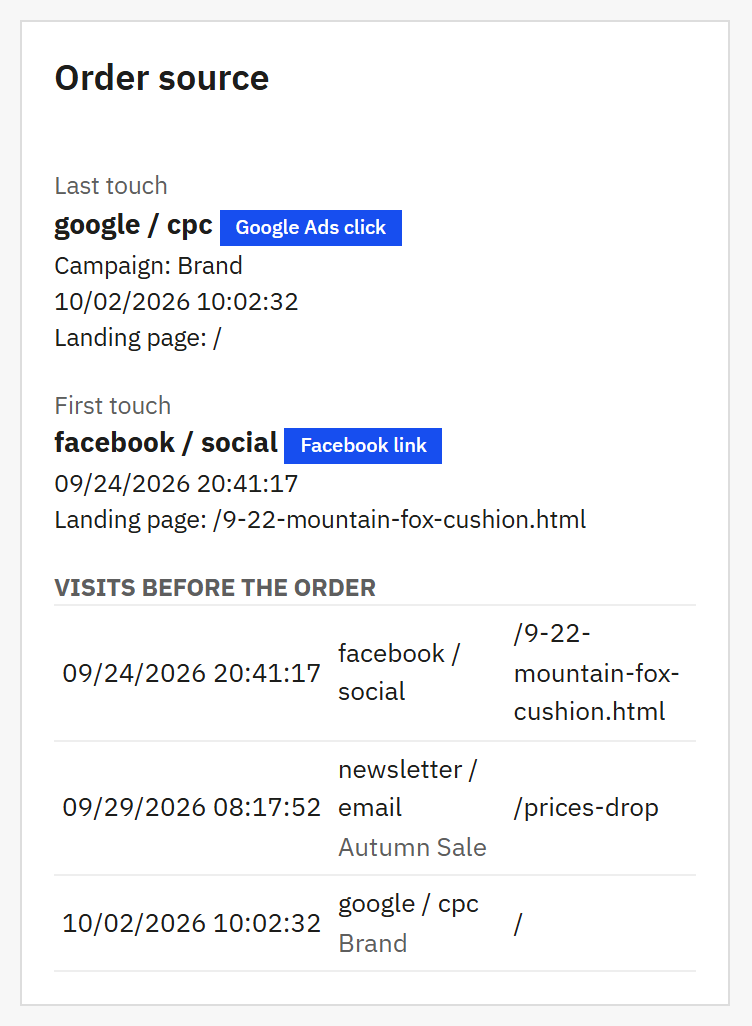
- Last touch: the last campaign, ad or site before the order. The small label says that it was a click on an ad.
- First touch: what first brought the customer.
- Visits before the order: every visit of this visitor that counted for the order, the oldest first.
The words used in this guide and in the module
| Word | What it means |
|---|---|
| Visitor | A browser. The shop gives it a random number in a cookie, so that it recognises the browser when it comes back. A visitor is not a person: see Known limits. |
| Visit | One arrival of a visitor in your shop. A visit ends after 30 minutes without a page view. The module stores one line per visit, not one per page. |
| Source | Where the visit came from: google, newsletter, facebook, the domain of a site that links to you. |
| Medium | The kind of traffic: cpc for paid clicks, organic for search results, email, social, referral for a link on another site. |
| Campaign | The name you gave a campaign in its link, for example spring-sale. |
| First touch | The earliest visit of the visitor that still counts for the order. |
| Last touch | The latest visit before the order that was not direct. |
| Direct | A visit without any information: the address was typed, a bookmark was used, or the link came from an app that tells nothing. The dashboard, the Source column and the order page show it as direct; the module’s lists and Test a link show what is stored, (direct) with the medium (none). |
| Not tracked | An order for which no source was recorded. It is not a fault: Orders without a source (Not tracked) says when this happens. |
| Attribution window | How many days before the order a visit still counts. 30 days after installation; you can change it (Attribution: the window and your own visits). |
A source and its medium are written together, with a slash: google / cpc, newsletter / email. These values are shown as they were recorded, the same in every language of the back office.
How the module decides the source of a visit
The shop looks at the address the visitor arrived on and at the page they came from. The first rule that fits decides:
- UTM parameters in the link, such as
utm_source=newsletter. You add them to the links you publish. - An ad click. Google, Microsoft and TikTok ads, and links on Facebook, add their own mark to the link. The module recognises it, so these clicks get a source even without UTM parameters.
- The page the visitor came from: one of your own rules for a partner site, a search engine, a social network, or any other site that links to you.
- Nothing of this: the visit is direct.
Building campaign links explains each rule, with examples. With Test a link you can try any link before you publish it (Test a link: see the source before you publish).
Where you see the source
Where you already work
- A Source column with a filter in PrestaShop’s own list of orders.
- The Order source card on the order page.
In the module’s own pages
- Dashboard: orders, revenue and visits per source (The dashboard).
- Orders and Visits: two lists you can filter and export (The Orders and Visits tabs).
- Settings (Settings).
The module’s pages are in one menu entry: Orders › Order sources.
What the module does not do
The module is exact about what it sees. It is just as clear about what it cannot see:
- A visitor is a browser. Someone who clicks an ad on a phone and buys on a laptop is two visitors. The order gets the source the laptop arrived with.
- Orders created in the back office have no source. No visit of the customer leads to them.
- Visitors who refuse the cookie are not tracked. That is also true for a browser that keeps no cookies.
- The numbers will not match Google Analytics. The two count different things: The numbers differ from Google Analytics explains why.
- No ad cost. The module does not read what a campaign cost you, so it shows revenue per source, not profit.
The full list is in Known limits.
How to read this guide
- Words in bold teal are labels exactly as the back office shows them, for example the Save button. A path such as Orders › Order sources means: open Orders in the menu, then Order sources.
- Text in a grey box, such as
utm_sourceorgoogle / cpc, is something you type or read exactly like that. - Numbered markers in a screenshot are explained in the list under it.
- The screenshots show a demo shop on PrestaShop 9.2. On PrestaShop 8 the pages of PrestaShop itself look slightly different; the module’s pages and labels are the same.
- If you only want the essentials, read Quick start.
- This guide exists in English, French, Spanish, German, Italian, Polish and Romanian, the languages of the module’s back office.