













Building campaign links
The module can only report what a link tells it. A link that names its campaign gives you a clear row on the dashboard; a link that says nothing ends up as a referral or as direct. This chapter shows how to build links that say enough, and how the module reads them.
UTM parameters: you name the source
UTM parameters are short notes at the end of a link, after a question mark. Every tool that sends traffic understands them: newsletter tools, ad platforms, the links you give to partners. The customer sees your page as usual.
https://www.example.com/en/?utm_source=newsletter&utm_medium=email&utm_campaign=spring-sale| Parameter | What you write | Examples |
|---|---|---|
utm_source | Who sends the visitor. The module needs this one: without it the other four are ignored. | newsletter, google, partner-blog |
utm_medium | The kind of traffic. If you leave it out, the medium is stored as (not set). | email, cpc, social, affiliate |
utm_campaign | The name of the campaign. It is the row you see when the dashboard is grouped by campaign. | spring-sale |
utm_term | Optional: the keyword of an ad. | running+shoes |
utm_content | Optional: which of several links or ads was clicked. | banner-top |
Rules that keep your reports tidy
- Decide on your names once and keep them.
newsletterandnews-letterare two sources, and two rows. - Capital letters do not matter for source and medium. The module stores both in small letters, so
Newsletterandnewsletterare one source. The campaign keeps its capital letters:Spring-Saleandspring-saleare two campaigns. - No spaces. Use a hyphen:
spring-sale. - The first parameter starts with a question mark, the others with
&. If the address already has a question mark, add your parameters with&.
Ad platforms: recognised without UTM parameters
Ad platforms can mark every click by themselves. They add a parameter with a long code to your link; this is called automatic tagging. The module recognises these marks, so an ad click gets a source even when the ad has no UTM parameters.
| The link carries | Recorded as | Label on the order page |
|---|---|---|
gclid, gbraid or wbraid | google / cpc | Google Ads click |
msclkid | bing / cpc | Microsoft Ads click |
ttclid | tiktok / cpc | TikTok Ads click |
fbclid | facebook / social | Facebook link |
- Facebook adds
fbclidto unpaid links too. That is why such a click is recorded associal, not as a paid click. - The module keeps the kind of click only. The code itself is never stored.
- UTM parameters win. When a link carries both, the UTM parameters decide the source, medium and campaign, and the label on the order page still says that it was an ad click.
- A click recognised by its mark alone has no campaign: grouped by campaign, it is in the row (no campaign). Add UTM parameters to the links of your ads to see campaign names.
- The module reads what brought the visitor, not what the click cost: ad cost and return on ad spend stay in your ad account.
Links without any parameter
When a link says nothing, the module looks at the page the visitor came from. Again the first rule that fits decides:
| The visitor comes from | Recorded as |
|---|---|
| A site with one of your referrer rules | The source, medium and campaign of the rule (Referrer rules: a source of your choice for a site). |
| A search engine | Its name, with the medium organic: google / organic. Recognised: Google, Bing, Yahoo, DuckDuckGo, Yandex, Baidu, Ecosia, Seznam and Brave. |
| A social network | Its name, with the medium social: facebook / social. Recognised: Facebook, Instagram, X, LinkedIn, Pinterest, YouTube, TikTok and Reddit, with their short link addresses. |
| Any other site | The domain of the site, with the medium referral: partner-blog.example / referral. |
| An excluded site, or no page at all | Direct: (direct) / (none), shown as direct on the dashboard. |
Only the search pages of a search engine count as search. A link in a web mail or a translation service of the same company is recorded as a referral.
Three worked examples
Try each of them in Settings › Test a link, with the address of your own shop in place of www.example.com.
A newsletter
You send a newsletter for your spring sale. Give every link in it the same three parameters:
https://www.example.com/en/?utm_source=newsletter&utm_medium=email&utm_campaign=spring-saleThe result: Source newsletter, Medium email, Campaign spring-sale, decided by “the UTM parameters of the link”. Test a link with the result for a newsletter link. shows this test, with the address of the demo shop.
A Google ad with automatic tagging
Your ad leads to a category page, and automatic tagging is switched on in your Google Ads account. Google adds gclid and a code to the address. To test it, add the parameter yourself with any value:
https://www.example.com/en/3-clothes?gclid=test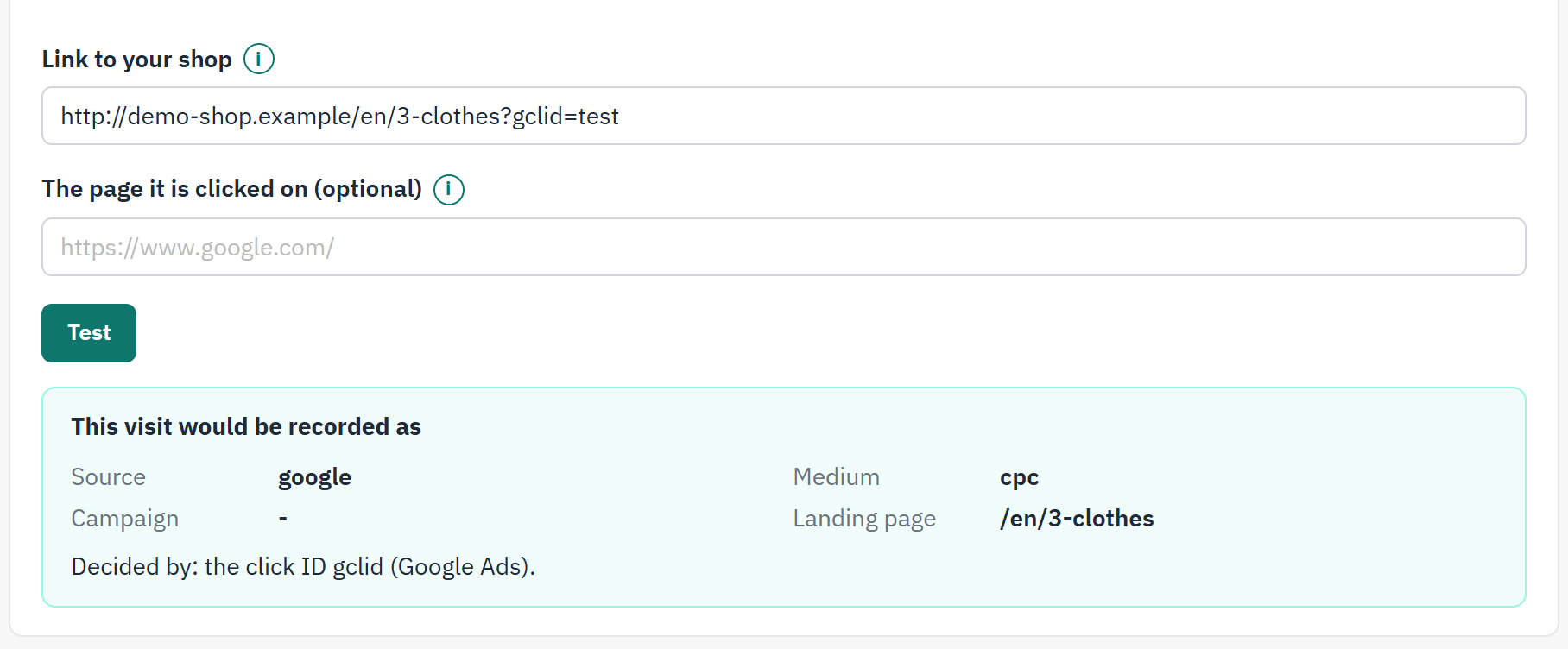
- The link with
gclid. - The visit would be recorded as
google / cpc, without a campaign. - Decided by names the mark and the platform.
To see the campaign too, add UTM parameters to the ad’s link in your ad account. The result then says “the UTM parameters of the link”, and the order page still shows Google Ads click.
A partner site
A blog writes about your products and links to your shop. You cannot change its links, so they carry no parameters.
- In Test a link, enter the address of your shop in Link to your shop and the address of the blog’s article in The page it is clicked on (optional). The result is
partner-blog.example / referral, decided by “the referring site”. - Open Settings › Referrer rules and add a rule: Domain
partner-blog.example, Sourcepartner-blog, Mediumaffiliate. - Test again. The result is now
partner-blog / affiliate, decided by “your referrer rule for partner-blog.example”.
When a click starts a new visit
The module stores a visit when a visitor arrives, not for every page. An arrival is a new visit in two cases:
- The visitor has not been in the shop for 30 minutes, or was never there before.
- The visitor arrives through a link of another campaign, even inside the 30 minutes. Clicking the newsletter and, ten minutes later, an ad gives two visits.
Opening the same campaign link again, reloading the page, or coming back from another site without campaign parameters continues the running visit. Coming back from the payment page is never an arrival.